Wednesday, November 17, 2010

Final Blog and Reflection

I have finally arrived at the end of this course and can honestly say that I have discovered so many new resources and tools that will assist me in the classroom and in my profession as a primary school teacher. The variety of resources available on the internet is truly incredible and never ceases to amaze me.

eLearning is so much more than electronic learning, it is about engaging learning and the iLE@RN model is ideal in exploring this. Some of the skills in the iLE@RN model are areas that many teachers are already achieving in their classrooms. Skills such as questioning, reflecting, communicating and collaborating, critical thinking and problem solving.


I find the below model of Bloom’s Taxonomy very interesting as it contains new elements that refer to digital verbs. This certainly shows how time is changing in education and learning. These new verbs would positively make a difference when planning the curriculum.

I can already see where many of the digital programs and websites would fit within the digital model of Blooms Taxonomy.

CREATING – flickr, wiki, you tube, itunes, midmeister

EVALUATING –podcasts

ANALYSING – glogster , second life

APPLYING – Delicious

UNDERSTANDING – twitter, blogs

REMEMBERING – google, yahoo, facebook

I look forward to exploring some of these new resources further and implementing them in my classroom. It has been wonderful to have this opportunity to learn these new skills with my colleagues and to keep updated on all the latest digital technologies available for us to use.

I have commented on some of the following blogs:
http://web2sue.blogspot.com/
http://web2chris.blogspot.com/


Sunday, November 14, 2010

Modules 9 and 10

Scootle's tagline is "Learn, teach and collaborate using digital curriculum resources". I read this and thought it may just be a website I could make good use of, and then I realised I had to subscribe.  I may look into this in the future, but for now just browsed as far as I could. There appears to be a lot of great resources available to teachers on this site and I like the icons at the top of the home page that let you access various areas of the site. These are learning objects, images, audio, video, collection, teacher resource and assessment resource.  I also liked that once you select your icon, you can then refine your search by looking specifically at different grades and KLA's. This would make searching for your resources so much easier.


Facebook, Twitter, MySpace...... social networking has taken over! I am an avid user of facebook and I enjoy communicating with my friends through the social networking site, however I don't see it as a positive tool for students, particularly primary students. I have heard of  teens that get themselves into trouble because they don't use the social networking site appropriately and this is a problem. I think the privacy settings on various social networking sites need to be upgraded if children are to use them. I also think parents need to be involved and present with their children if and when they access them. Twitter is something  I have perused but do not have an interest in getting involved with. It may be a site that could work in schools, if used correctly. Teachers could use it for any brief notes, although we already do this on our desktop.


Second Life is an interesting tool that I have not come across before. I think children would really enjoy using this site, as it is almost like playing a video game in a 3D virtual world. Children could take on characters to explore various themes and topics as they are immersed in a virtual world of learning. Some of the educational tasks they can be apart of in Second Life include: roleplaying, going on a scavenger hunt, guided tours, learning by doing activities, co-creation activities, simulation activities, quizzes and tutorials tutorials.

Other social networks which can be used for educational purposes are wikis and nings. Sounds like a completely new language! I was surprised to learn that wikipedia is actually a wiki! I have used wikipedia so many times but I now know that it is an actual wiki as it is an online encylopedia which is collaborated by many. Nings are very similar to wikis and are also online social networks used to communicate with others about certain issues. A school based wiki or ning could definitely be useful and a worthwhile tool for teachers and students to use.

Monday, November 8, 2010

Module 5 - Podcasts and Vodcasts and Itunes.. Oh My!

Even though I have been involved in this Web 2.0 course for over a term now, it still amazes me that there is MORE Information Technology available that can be used in the classroom today!

Podcasts and Vodcasts have been around for some time now and are simply audio files and videos respectively. I have downloaded podcasts before via itunes but have never considered using or creating them in the classroom. I think the children would really enjoy creating their own and maybe to some extent, I have done this with them, without realising. I have recorded audio files before using music and their voices to use for educational purposes but have not made these available on the internet. I wonder, is this still classified as a podcast?

Digital Storytelling in the classroom is something that I have been involved in this year with my Kindergarten class. This year we have explored Fairytales in Literacy and as a class we re-told the story of The Little Red Hen. We used photos, pictures, music, microphones and props to re-tell this much loved classic tale and created a digital story that the children loved creating and watching. We also used digital story telling to display some of the activities we have been doing in Kindergarten this year and we shared this with the school and parents at our assembly in Term 2.

Itunes is a fantastic site that I use frequently. I use it personally to download the music I enjoy, but have also used it to find appropriate songs and music for my class. The variety and options are endless and you can almost always find what you are looking for. I know that we are looking at creating an Itunes account at school which will be available for all teachers to use. We would all benefit from this and can also share music and files with each other. The SRC are also looking into buying some ipods for each stage to use, which we could then all use in conjunction with the school's itunes account.

Thursday, October 21, 2010

Modules 7 and 8 - Delicious and RSS

Another day, another two modules! Today we looked at a social bookmarking site called Delicious. Scott talked us through it  and was able to show us exactly how to create a Delicious account. It was unanimous - this would be a fantastic site for staff to share their bookmarks. I often email valuable websites to myself or my grade partner, or I add them to my favourites. Having them all in the one place (and whichever computer I like) would make life much easier. The only downfall I saw, was creating yet another email account! So many addresses, passwords, user names to remember!!!

The next module we looked at today was RSS. Something that sounded complicated at first, until Scott explained exactly what it was. RSS (or Rich Site Summary) is basically a "subscription" to a website, blog or page that has constantly changing content. Anytime you see the above icon, then you know that RSS is available to for that site. After we learnt this, we started browsing for websites that had this icon. All websites have this icon, but they aren't all orange. A lot of the ones I came across today were black and white which means I am unable to "subscribe". RSS is valuable as it allows you to stay "in touch" with relevant information that is important to you. I will definitely be more aware of the icon now that I know what it means. It will also be beneficial if I come across any interesting educational sites that I would like to hear from on a regular basis.

Monday, September 20, 2010

Module 6 - Mind Mapping and Glogging

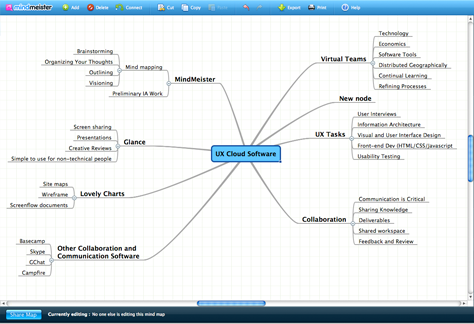
The sixth module entails looking at two very interesting ways to create and communicate online. The first site we went to look at was Bubbl.us, however this site didn't seem to be working. Lucky we had Scott to guide us and found another alternative in Mindmeister. What a great tool for creating mind maps and brainstorms with your class! I think this would work well on a smartboard and would like to attempt it for a new topic next term. Mindmeister was quite easy to use and definitely a site for the primary children to explore.


The second site we had a look at was Glogster. I had a lot of fun experimenting with the site and found it a great creative outlet. This is aimed at older children, however I could always use this site to present new information/pictures to my Kindergarten class. A glog is an online poster that is similar to the 'old fashioned' cardboard poster. The range of images, backgrounds, colours, fonts you can use is amazing. I thoroughly enjoyed making my New York City poster on glogster and actually didn't want to tear myself away. Glogster seems to be targeted towards teenagers as the online glogs available for viewing contained "teenage" content.

Another great session with Scott... look forward to some more in Term 4.

Friday, September 3, 2010

Module 4- Flickr

Another week, another module! This week was all about the site Flickr. After evetually finding a laptop that worked and moved at a reasonable pace, I was able to get on to this site. It's essentially a site to share your photos with others, but also can be used to find suitable pictures for your own use. Since I have an upcoming trip to New York, I thought I'd look for a photo of Broadway and was pleased with the results that came back.
It was an easy site to use and would be great for the classroom when sourcing pictures for various lessons, rather than googling images that are not always 'child friendly'.


The second half of our morning was spent looking at youtube. I am very familiar with youtube and have found some excellent videos on the site for educational and entertaining purposes. Recently, my grade partner and I have found some great clips of fairytales which we have been able to share with our class on our smartboards. We have also uploaded these clips to our myclasses page so our students can enjoy these stories at home too. Again with youtube, you have to be careful when searching for clips as they are not always suitable for children.

Tuesday, August 31, 2010

Module 3 - Google Docs

Today I got back on track with the Web 2.0 course. I've just had a look at some interesting youtube videos outlining the importance of Google Docs and how they actually work. I think it is a great idea having one document to share with others, rather than always emailing attachments back and forth. I've done the latter and it's hard to keep up with copies coming back and forth and often causes headaches and an abundance of emails sitting in your inbox.

Google Docs makes life so much easier by allowing all people involved to edit and work on the same document. I would definitely consider using these with my colleagues, in particular my grade partner. We could use it to edit assessments, worksheets, timetables and much more. I don't see my Kindergarten class using it, but it's certainly a worthwhile tool for teachers.