Thursday, October 21, 2010

Modules 7 and 8 - Delicious and RSS

Another day, another two modules! Today we looked at a social bookmarking site called Delicious. Scott talked us through it  and was able to show us exactly how to create a Delicious account. It was unanimous - this would be a fantastic site for staff to share their bookmarks. I often email valuable websites to myself or my grade partner, or I add them to my favourites. Having them all in the one place (and whichever computer I like) would make life much easier. The only downfall I saw, was creating yet another email account! So many addresses, passwords, user names to remember!!!

The next module we looked at today was RSS. Something that sounded complicated at first, until Scott explained exactly what it was. RSS (or Rich Site Summary) is basically a "subscription" to a website, blog or page that has constantly changing content. Anytime you see the above icon, then you know that RSS is available to for that site. After we learnt this, we started browsing for websites that had this icon. All websites have this icon, but they aren't all orange. A lot of the ones I came across today were black and white which means I am unable to "subscribe". RSS is valuable as it allows you to stay "in touch" with relevant information that is important to you. I will definitely be more aware of the icon now that I know what it means. It will also be beneficial if I come across any interesting educational sites that I would like to hear from on a regular basis.

Monday, September 20, 2010

Module 6 - Mind Mapping and Glogging

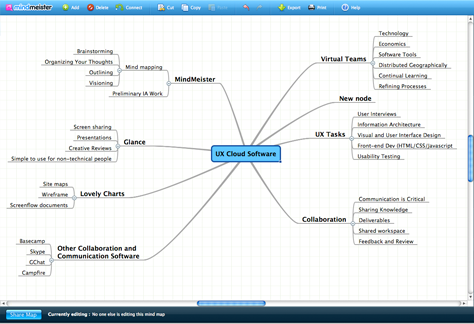
The sixth module entails looking at two very interesting ways to create and communicate online. The first site we went to look at was Bubbl.us, however this site didn't seem to be working. Lucky we had Scott to guide us and found another alternative in Mindmeister. What a great tool for creating mind maps and brainstorms with your class! I think this would work well on a smartboard and would like to attempt it for a new topic next term. Mindmeister was quite easy to use and definitely a site for the primary children to explore.


The second site we had a look at was Glogster. I had a lot of fun experimenting with the site and found it a great creative outlet. This is aimed at older children, however I could always use this site to present new information/pictures to my Kindergarten class. A glog is an online poster that is similar to the 'old fashioned' cardboard poster. The range of images, backgrounds, colours, fonts you can use is amazing. I thoroughly enjoyed making my New York City poster on glogster and actually didn't want to tear myself away. Glogster seems to be targeted towards teenagers as the online glogs available for viewing contained "teenage" content.

Another great session with Scott... look forward to some more in Term 4.

Friday, September 3, 2010

Module 4- Flickr

Another week, another module! This week was all about the site Flickr. After evetually finding a laptop that worked and moved at a reasonable pace, I was able to get on to this site. It's essentially a site to share your photos with others, but also can be used to find suitable pictures for your own use. Since I have an upcoming trip to New York, I thought I'd look for a photo of Broadway and was pleased with the results that came back.
It was an easy site to use and would be great for the classroom when sourcing pictures for various lessons, rather than googling images that are not always 'child friendly'.


The second half of our morning was spent looking at youtube. I am very familiar with youtube and have found some excellent videos on the site for educational and entertaining purposes. Recently, my grade partner and I have found some great clips of fairytales which we have been able to share with our class on our smartboards. We have also uploaded these clips to our myclasses page so our students can enjoy these stories at home too. Again with youtube, you have to be careful when searching for clips as they are not always suitable for children.

Tuesday, August 31, 2010

Module 3 - Google Docs

Today I got back on track with the Web 2.0 course. I've just had a look at some interesting youtube videos outlining the importance of Google Docs and how they actually work. I think it is a great idea having one document to share with others, rather than always emailing attachments back and forth. I've done the latter and it's hard to keep up with copies coming back and forth and often causes headaches and an abundance of emails sitting in your inbox.

Google Docs makes life so much easier by allowing all people involved to edit and work on the same document. I would definitely consider using these with my colleagues, in particular my grade partner. We could use it to edit assessments, worksheets, timetables and much more. I don't see my Kindergarten class using it, but it's certainly a worthwhile tool for teachers.

Wednesday, August 18, 2010

First day of Web 2.0 - Modules 1 and 2

Today I began the Web 2.0 course. I have started this course along with my colleagues to assist me in using different types of technology in my classroom.


Firstly I created a new email address from google. This was quite straight forward as the google website is easy to navigate around. I enjoyed "adding stuff" to my personalised google page and choosing a theme to decorate it.


The next part of the course today was beginning my first blog. I have been curious about blogs for and have read several on the internet, but I've never been certain on how to start my own. So far, so good! I have managed to get started on my own blog and hope to add more as I continue learning.

A journey of a thousand sites begins with a single click. ~Author Unknown